How devices interact with Linux Kernel ?
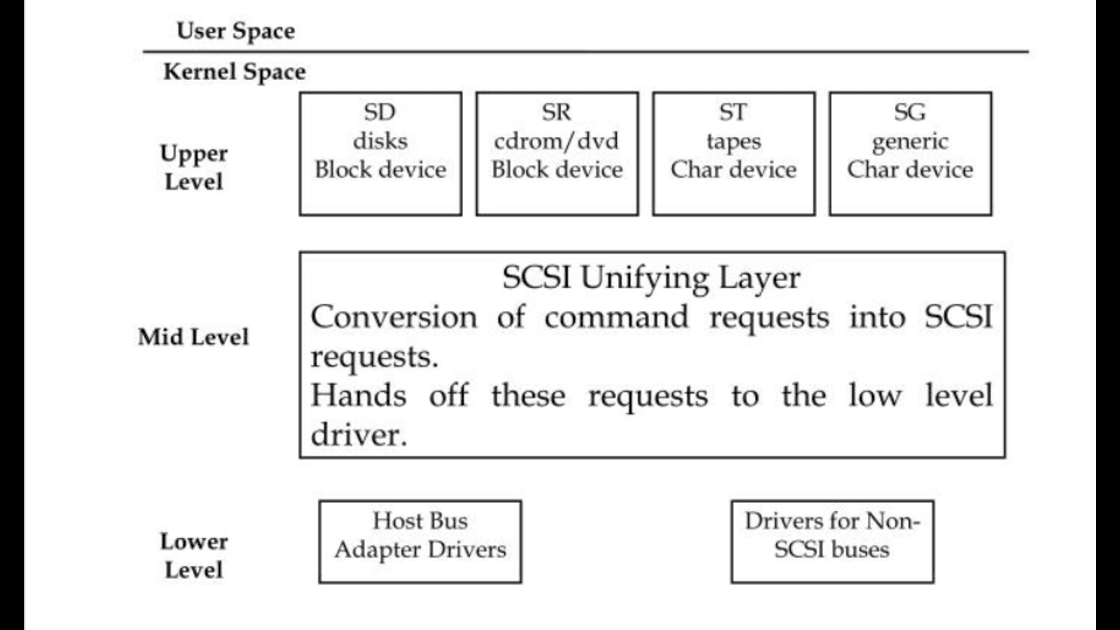
This note is about the kernel-provided device infrastructure in a functioning Linux system. It is important to understand how the kernel interacts with user-space when presented with new devices.
Device File
1
2
3
4
5
6
7
8
9
10
11
12
13
14
15
16
$ ls -l /dev

# Output
total 0
crw-r--r--   1 root    root     10, 235 Jan 14 16:27 autofs
drwxr-xr-x   2 root    root        1580 Jan 16 22:48 block
drwxr-xr-x   2 root    root          80 Jan 14 16:27 bsg
crw-------   1 root    root     10, 234 Jan 14 16:27 btrfs-control
drwxr-xr-x   3 root    root          60 Jan 14 16:27 bus
lrwxrwxrwx   1 root    root           3 Jan 14 16:27 cdrom -> sr0
drwxr-xr-x   2 root    root        4700 Jan 14 16:28 char
crw--w----   1 root    tty       5,   1 Jan 14 16:27 console
lrwxrwxrwx   1 root    root          11 Jan 14 16:27 core -> /proc/kcore
drwxr-xr-x  10 root    root         200 Jan 14 16:27 cpu
...
...
If the first character of each line is b, c, p or s the file is a device. Similar to how d is a directory.
b- Block device: data is accessed in fixed-size block.1 2 3 4 5 6 7 8 9 10 11
$ lsblk # Output sda 8:0 0 476.9G 0 disk ├─sda1 8:1 0 512M 0 part /boot/efi ├─sda2 8:2 0 146.7G 0 part /var/snap/firefox/common/host-hunspell │ / ├─sda3 8:3 0 134.4G 0 part ├─sda4 8:4 0 16M 0 part └─sda5 8:5 0 195.3G 0 part sr0 11:0 1 1024M 0 rom
c-Character device: data is accessed as a stream of bytes(raw)1
$ echo blah blah > /dev/null
/dev/nullis the black hole of filesystem. It is the place you send stuff when you never want to see or keep it again.p- Named pipes are like character devices, with another process at the other end of the I/O stream instead of a kernel driver.s- Sockets are special-purpose interfaces that are used for interprocess communication.
The sysfs device path
The sysfs device path is the kernel’s official address for a device inside /sys/devices/ . It is the single source of truth for everything udev know about hardware -topology, properties, state, tunables.
1
2
3
4
5
6
7
8
9
10
11
/
└── sys
    ├── block/          ← Block devices (disks, partitions) with symlinks
    ├── bus/            ← Buses (pci, usb, i2c, etc.) + drivers/devices subdirs
    ├── class/          ← Classes (net, input, sound, video, etc.)
    ├── dev/            ← Major:minor → symlinks to real device dirs
    ├── devices/        ← ←← The heart: hierarchical device tree ←←←
    ├── firmware/       ← Firmware-related (e.g. ACPI, EFI)
    ├── kernel/         ← Kernel tunables, debug
    ├── module/         ← Loaded kernel modules + parameters
    └── ...             (power, fs, etc.)
Example
1
2
# In my ProxMox Console
root@pve:~ udevadm info -a -n /dev/nvme1n1
1
2
3
4
5
6
7
8
9
10
11
12
13
14
15
16
17
# Output
Udevadm info starts with the device specified by the devpath and then
walks up the chain of parent devices. It prints for every device
found, all possible attributes in the udev rules key format.
A rule to match, can be composed by the attributes of the device
and the attributes from one single parent device.

  looking at device '/devices/pci0000:16/0000:16:05.5/pci10000:00/10000:00:00.0/10000:01>
    KERNEL=="nvme1n1"
    SUBSYSTEM=="block"
    DRIVER==""
    ATTR{alignment_offset}=="0"
    ATTR{capability}=="0"
    ATTR{csi}=="0"
    ATTR{discard_alignment}=="0"
    ATTR{diskseq}=="16"
    ATTR{events}==""
When we search for /dev/nvme1n1/ , it started looking for device in /sys/devices/... . We will talk more about udev later.
dd - data duplicator
Also known as disk destroyer if used carelessly. It converts and copy a file. It is useful for imaging, wiping, cloning, forensics and boot media.
- Create bootable USN from ISO
1
2
$ sudo dd if=ubuntu-24.04-desktop-amd64.iso of=/dev/sdx bs=4M status=progress conv=fsync
$ sudo sync   # ensure flush
- Backup entire disk to image file
1
$ sudo dd if=/dev/nvme0n1 of=/mnt/backup/nvme0n1-$(date +%F).img bs=64M status=progress conv=noerror,sync
- Restore image to disk
1
sudo dd if=backup.img of=/dev/sda bs=64M status=progress
- Wipe a drive
1
2
3
 sudo dd if=/dev/zero of=/dev/sdx bs=4M status=progress
 # or more secure (random data, slower)
 sudo dd if=/dev/urandom of=/dev/sdx bs=4M status=progress
- Clone one disk to another (same size required)
1
sudo dd if=/dev/sda of=/dev/sdb bs=128M status=progress
Common Linux devices and their naming convention
| Device Type | Primary Name Pattern | Examples | Partitions / Sub-Devices Example | Notes / When You See It |
|---|---|---|---|---|
| SATA / SCSI / USB mass storage disks | /dev/sdX | /dev/sda, /dev/sdb, /dev/sdc | sda1, sda2, … | Most common for HDDs, SSDs (SATA), external USB drives |
| NVMe SSDs (PCIe) | /dev/nvmeXnY | /dev/nvme0n1, /dev/nvme1n1 | nvme0n1p1, nvme0n1p2, … | Modern high-speed internal SSDs (most laptops/desktops since ~2018) |
| MMC / eMMC / microSD / SD cards | /dev/mmcblkX | /dev/mmcblk0, /dev/mmcblk1 | mmcblk0p1, mmcblk0p2, … | Phones, Raspberry Pi, embedded devices, card readers |
| Virtio virtual disks (VMs) | /dev/vdX | /dev/vda, /dev/vdb | vda1, vda2, … | KVM/QEMU, many cloud providers (AWS, GCP, Azure, DigitalOcean) |
| Old parallel/IDE/PATA disks | /dev/hdX | /dev/hda, /dev/hdb (very rare) | hda1, hda2, … | Pre-2007 hardware – almost extinct now |
| Optical drives (CD/DVD/Blu-ray) | /dev/srX or /dev/scdX | /dev/sr0, /dev/sr1 | — | CD/DVD/BD burners & readers |
| RAM disks | /dev/ramX | /dev/ram0, /dev/ram1 | — | In-memory block devices (initramfs, testing) |
| Loop devices (mount disk images) | /dev/loopX | /dev/loop0, /dev/loop1, … | — | Used by mount -o loop, snapd, img files |
| Serial ports (USB → serial) | /dev/ttyUSBX | /dev/ttyUSB0, /dev/ttyUSB1 | — | USB-to-serial adapters, Arduino, ESP32, many embedded devices |
| USB CDC ACM serial (modems, phones) | /dev/ttyACMX | /dev/ttyACM0, /dev/ttyACM1 | — | Android devices in debug mode, 3G/4G/5G modems |
| Hardware serial (COM ports) | /dev/ttySX | /dev/ttyS0, /dev/ttyS1 | — | Physical RS-232 ports (rare on modern consumer PCs) |
| Virtual terminals / consoles | /dev/ttyX | /dev/tty1 – /dev/tty63 | — | Text consoles (Ctrl+Alt+F1–F6), /dev/tty0 = current VT |
| Pseudo-terminals (SSH, tmux, etc.) | /dev/pts/X | /dev/pts/0, /dev/pts/1, … | — | Every terminal emulator / SSH session |
| Input devices (mouse, keyboard, etc.) | /dev/input/eventX | /dev/input/event3, /dev/input/event12 | — | evdev interface – main way modern apps read input |
| Legacy mouse devices | /dev/input/mouseX | /dev/input/mouse0, /dev/input/mouse1 | — | Old compatibility layer (rarely used now) |
| Video capture / webcams | /dev/videoX | /dev/video0, /dev/video1 | — | Webcams, capture cards (Video4Linux / v4l2) |
| Special files (null, zero, random) | /dev/null, /dev/zero, etc. | /dev/null, /dev/urandom | — | /dev/null = black hole, /dev/zero = infinite zeros, etc. |
udev
udev(short for userspace /dev) is the dynamic device manager for the Linux kernel. It handles device detection, creation of device node in /dev/.
How it works?
- Kernel detects the change -> sends a uevent through internal network link
- It looks at device properties (from /sys/, like vendor ID, product ID, serial number, driver, etc.)
- It reads udev rules files in lexical (alphabetical) order
- Matching rules → execute actions:
- Creates /dev/sda, /dev/video0 , etc
- Creates nice symlinks (/dev/disk/by-id/usb-…)
- Set permissions / owner / group
- Run programs (mount drive, load firmware, change keyboard repeat rate, start backup script, etc.)
- Rename network interfaces (→ enp5s0, wlp3s0, predictable names)
Where are the udev rules?
Default rules are in /lib/udev/rules.d and override rules are in /etc/udev/rules.d. Place custom rules in /etc/udev/rules.d/ with a high number prefix like 99-my-custom.rules (higher number = processed later, overrides earlier rules).
1
2
3
4
5
$ ls /lib/udev/rules.d

39-usbmuxd.rules                       75-net-description.rules
40-usb-media-players.rules             75-probe_mtd.rules
40-usb_modeswitch.rules                77-mm-broadmobi-port-types.rules
1
2
3
4
$ ls /lib/udev/rules.d
70-snap.anki-ppd.rules             70-snap.ktouch.rules
70-snap.canonical-livepatch.rules  70-snap.snapd-desktop-integration.rules
70-snap.discord.rules              70-snap.snapd.rules
what a rule looks like?
1
2
3
4
5
6
7
8
9
10
11
12
13
14
#Output

# do not edit this file, it will be overwritten on update

# persistent storage links: /dev/disk/{by-id,by-uuid,by-label,by-path}
# scheme based on "Linux persistent device names", 2004, Hannes Reinecke <hare@suse.de>
.
.
.
# ATA
KERNEL=="sd*[!0-9]|sr*", ENV{ID_SERIAL}!="?*", SUBSYSTEMS=="scsi", ATTRS{vendor}=="ATA", IMPORT{program}="ata_id --export $devnode"
KERNEL=="sd*[!0-9]|sr*", ENV{ID_BUS}=="ata", ENV{ID_ATA_PERIPHERAL_DEVICE_TYPE}=="20", PROGRAM="scsi_id -u -g $devnode", \
  SYMLINK+="disk/by-id/scsi-$result$env{.PART_SUFFIX}"
This file contains built-in rules that help create persistent (stable, reliable) names for storage devices — so your disks don’t get renamed randomly (e.g. /dev/sda today might become /dev/sdb tomorrow after a reboot or adding/removing hardware).
What it means: For normal SATA/ATA drives, please read their real hardware serial/ID so we can give them forever-stable names under /dev/disk/by-id/.
Examples
1
2
3
# Monitor live udev events
$ udevadm monitor
$ udevadm monitor --kernel --subsystem-match=scsi
1
2
# Show very detailed info about a device
$ udevadm info -a -p /sys/block/sda
1
2
3
4
5
6
7
8
9
10
11
# list device by id
$ ls -l /dev/disk/by-id/

total 0
lrwxrwxrwx 1 root root  9 Jan 14 16:27 ata-KingFast_02212221M0028 -> ../../sda
lrwxrwxrwx 1 root root 10 Jan 14 16:27 ata-KingFast_02212221M0028-part1 -> ../../sda1
lrwxrwxrwx 1 root root 10 Jan 14 16:27 ata-KingFast_02212221M0028-part2 -> ../../sda2
lrwxrwxrwx 1 root root 10 Jan 14 16:27 ata-KingFast_02212221M0028-part3 -> ../../sda3
lrwxrwxrwx 1 root root 10 Jan 14 16:27 ata-KingFast_02212221M0028-part4 -> ../../sda4
lrwxrwxrwx 1 root root 10 Jan 14 16:27 ata-KingFast_02212221M0028-part5 -> ../../sda5
lrwxrwxrwx 1 root root  9 Jan 14 16:27 ata-TSSTcorp_DVD-RW_SH-216BB_R8UU68DCA00DJ2 -> ../../sr0
My favorite
udevadmcommandHey udev, tell me everything you have recorded about
/dev/sda- all properties, IDs, paths, environment variables, symlinks, etc.
4. bash $ udevadm info --query=all --name=/dev/sda
1
2
3
4
5
6
7
8
9
10
11
12
13
14
15
16
17
18
19
```bash
    # Output
    P: /devices/pci0000:00/0000:00:1f.2/ata2/host1/target1:0:0/1:0:0:0/block/sda
    M: sda
    U: block
    T: disk
    D: b 8:0
    N: sda
    L: 0
    S: disk/by-diskseq/11
    S: disk/by-id/ata-KingFast_02212221M0028
    S: disk/by-path/pci-0000:00:1f.2-ata-2.0
    S: disk/by-path/pci-0000:00:1f.2-ata-2
    Q: 11
    E: DEVPATH=/devices/pci0000:00/0000:00:1f.2/ata2/host1/target1:0:0/1:0:0:0/block/sda
    E: DEVNAME=/dev/sda
    E: DEVTYPE=disk

```
Breakdown of output:
- P: The full sysfs device path (the kernel’s hierarchical address)
- N: The actual device node name (sda)
- S: All symlinks that point to this device (created by udev rules, like /dev/disk/by-id/…)
- E: Environment variables (key=value pairs) — these are what udev rules can match on!
- Things like ID_VENDOR, ID_MODEL, ID_SERIAL, ID_WWN, MAJOR/MINOR, etc.
- Super useful for writing rules: ATTRS{idVendor}==”…”
SCSI and Linux Kernel
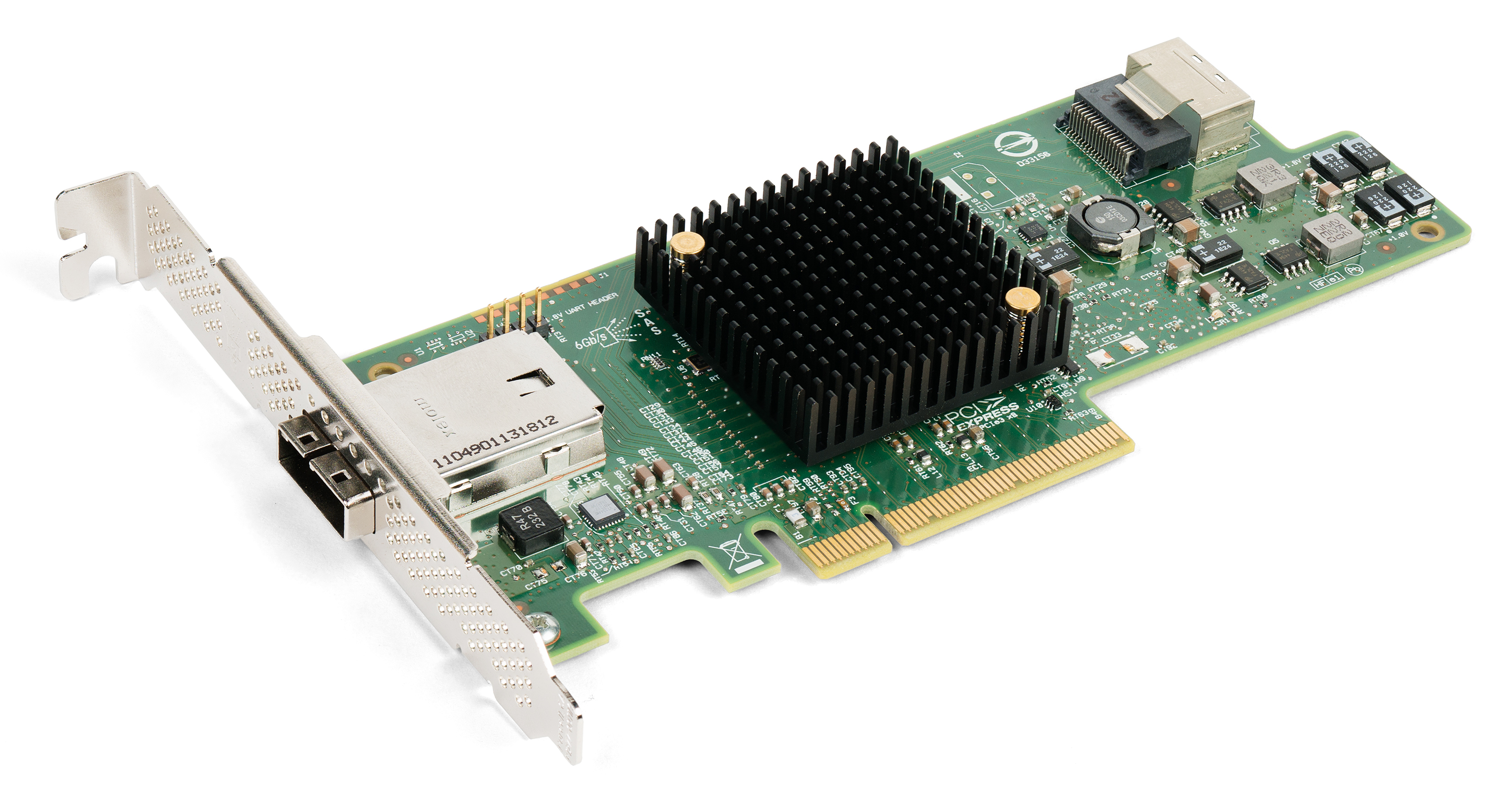
Fig: LSI 9207-4i4e SAS HBA. PCI Express 3.0 x8 expansion card. One x4 mini-SAS internal connector (SFF-8087) One x4 mini-SAS external connector (SFF-8088) Up to 256 SAS or SATA end devices
SCSI: Small Computer System Interface
SAS: Serial Attached SCSI
SATA: Serial Advanced Technology Attachment
In Linux, SCSI = the universal language for block storage. Even if your drive isn’t physically SCSI, the kernel often speaks SCSI to it (or emulates it) because the subsystem is mature, feature-rich, and already handles queuing, errors, multipath, etc. perfectly.
Here is a high-level overview of Linux SCSI subsystem
1
2
3
4
5
6
7
8
9
10
11
12
13
14
15
16
17
18
19
20
21
22
23
24
25
26
27
28
29
30
31
32
33
34
35
36
                Userspace / VFS / Applications
                         ↓
                Block Layer (request_queue, bio, make_request_fn)
                         ↓
   ┌─────────────────────────────────────────────────────────────┐
   │                      SCSI Upper Layer                       │
   │   (drivers/scsi/sd.c, sr.c, st.c, sg.c, ch.c, ...)          │
   │   - /dev/sd*  (disks)                                       │
   │   - /dev/sr*  (optical/CD/DVD)                              │
   │   - /dev/st*  (tapes)                                       │
   │   - /dev/sg*  (generic/raw SCSI passthrough)                │
   └─────────────────────────────────────────────────────────────┘
                         ↓   ↑   (SCSI commands / Cmnd structs)
                 ┌───────────────────────────────┐
                 │        SCSI Mid-Layer         │
                 │   (drivers/scsi/scsi*.c)      │
                 │   - Command queuing           │
                 │   - Error handling / recovery │
                 │   - Timeout management        │
                 │   - Device scanning / hotplug │
                 │   - Transport classes         │
                 │   - Sense data parsing        │
                 └───────────────────────────────┘
                         ↓   ↑   (SCSI Host Template / queuecommand)
   ┌─────────────────────────────────────────────────────────────┐
   │                      SCSI Lower Layer                       │
   │   (Low-Level Drivers / Host Bus Adapters)                   │
   │   Examples:                                                 │
   │   - drivers/ata/libata-* + ahci (SATA)                      │
   │   - drivers/scsi/mpt3sas, qla2xxx (SAS/FC)                  │
   │   - drivers/usb/storage (USB Mass Storage / UAS)            │
   │   - drivers/scsi/iscsi_tcp, ib_srpt (iSCSI/SRP)             │
   └─────────────────────────────────────────────────────────────┘
                         ↓   ↑   (hardware-specific protocol)
                Physical Hardware / Bus
          (SATA cables, SAS expanders, FC fabric, USB, Ethernet…)
Example: My Proxmox Devices
1
2
3
root@pve:~# lsscsi

[host:channel:target:lun]    type    vendor    model    revision    /dev/device
1
2
3
4
5
6
7
8
9
10
11
12
# Output
[0:0:0:0]    disk    ATA      Micron 1300 SATA 0030  /dev/sda
[1:0:0:0]    disk    ATA      WDC WD5000LPLX-7 1A04  /dev/sdb
[2:0:0:0]    disk    ATA      SanDisk SD7TB6S2 1201  /dev/sdc
[3:0:0:0]    disk    ATA      WDC WD5000LPLX-7 1A04  /dev/sdd
[6:0:0:0]    cd/dvd  PLDS     DVD+-RW DU-8A5LH 6D1M  /dev/sr0
[7:0:0:0]    disk    ATA      SanDisk SD7TB6S2 1201  /dev/sde
[8:0:0:0]    disk    Generic- SD/MMC CRW       1.00  /dev/sdf
[N:0:8215:1] disk    PC SN730 NVMe WDC 1024GB__1                /dev/nvme0n1
[N:1:6:1]    disk    PM9A1 NVMe Samsung 2048GB__1               /dev/nvme1n1
[N:2:4:1]    disk    PM981a NVMe Samsung 512GB__1               /dev/nvme2n1
[N:3:1:1]    disk    PC401 NVMe SK hynix 512GB__1               /dev/nvme3n1