tarball- Linux
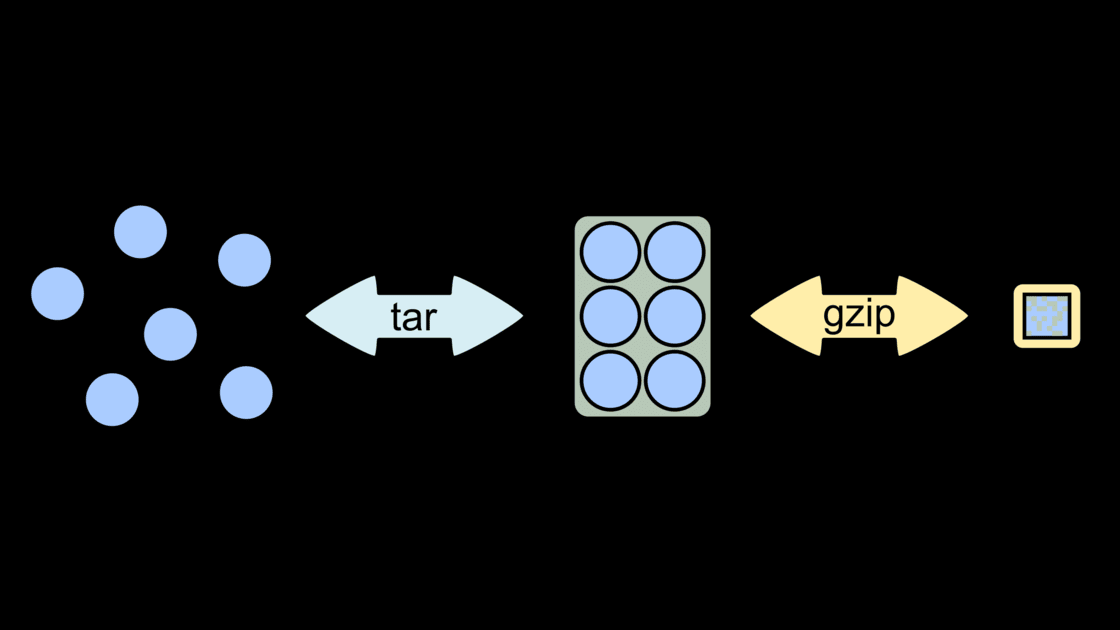
tar stands for tape archive. It is used to create an archive or extract the archive. A compressed or uncompressed archive can be created with it. A file with tar extension is commonly called “tarball”.
file.tar.gz- means archived and compressedfile.gz- means only compressed, simplegzipandgunzipcommand works with it.
Archive = bundling / packaging multiple things together
Compress = shrinking / squeezing to save space
Syntax
1
tar [options] [archive-file] [file or directory to be archived]
| options |
|---|
| -c : Creates Archive |
| -x : Extract the archive |
| -f : creates archive with given filename |
| -t : displays or lists files in archived file |
| -u : archives and adds to an existing archive file |
| -v : Displays Verbose Information |
| -A : Concatenates the archive files |
| -z : zip, tells tar command that creates tar file using gzip |
| -j : filter archive tar file using tbzip |
| -W : Verify a archive file |
| -r : update or add file or directory in already existed .tar file |
The magic behind configure, make, make install
1
2
3
./configure    #Configure the software
make           #Build the software
make install   #Install the software
Example
1
2
3
4
5
6
7
8
9
10
11
12
13
14
# Download the desired .tar.gz or (.tar.bz2) file
# Open Terminal

# Extract the .tar.gz or (.tar.bz2) file with the following commands
tar xvzf PACKAGENAME.tar.gz
tar xvjf PACKAGENAME.tar.bz2

# Navigate to the extracted folder using cd command
cd PACKAGENAME

# Now run the following command to install the tarball
./configure
make
sudo make install
zip/unzip
for files ending with .zip, we can use the zip and unzip command. Here is a list of some of the mst useful commands.
| Command | What it does | When you need it |
|---|---|---|
unzip file.zip | Extract everything to current folder | Basic extract |
unzip file.zip -d myfolder | Extract into a specific folder | Avoid mess in current directory |
unzip -l file.zip | List contents (don’t extract) | Check what’s inside first |
unzip file.zip somefile.txt | Extract only specific file(s) | Need just one file |
zip -r archive.zip folder/ | Zip a whole folder recursively | Most common “backup / share folder” |
zip -r archive.zip . | Zip everything in current directory | Quick full current-folder archive |
zip -r -9 archive.zip folder/ | Zip with maximum compression | When file size really matters |
zip -u archive.zip newfile.txt | Add / update file in existing zip | Incrementally add files later |
This post is licensed under CC BY 4.0 by the author.