WireGuard- How to setup VPN Tunnel
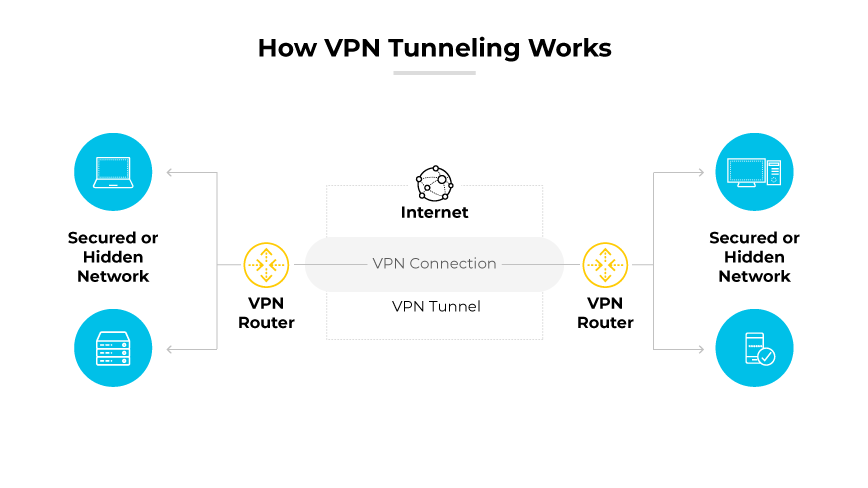
When I searched - popular tunneling protocols in 2025, three names stood out- WireGuard, OpenVPN and IKEv2/IPsec. I have used PulseSecure and Global Protect which are proprietary VPNs, so whats the difference between all these VPN solutions then? The answer is quite complex and beyond what I can comprehend. Each one is built for slightly different purposes — one might be faster, another better for phones, another more secure in certain ways. The “best” one really depends on what you need. So instead of getting lost in the differences, let’s ask a simpler question:
What all these solutions have in common that makes it a VPN?
The answer is this abstract architecture mindmap. Think of it as a layered, zoomed-out mental model of how almost any modern VPN actually works.
1
2
3
4
5
6
7
8
9
10
11
12
13
14
15
16
17
18
19
20
21
22
23
24
25
26
27
28
29
30
31
32
33
34
35
36
37
38
39
40
41
42
43
44
45
46
47
48
                              ┌───────────────────────────────--┐
                              │          APPLICATION LAYER      │
                              │   (Your browser, Zoom, Discord, │
                              │    games, etc. – normal sockets)│
                              └───────────────┬───────────────--┘
                                              │ normal IP packets
                                              ▼
┌───────────────────────────────────────────────────────────────────────┐
│                  VPN CLIENT (on your device)                          │
│                                                                       │
│   ┌───────────────┐          ┌─────────────────────┐                  │
│   │ TUN/TAP       │◄───────► │ VPN TUNNELING ENGINE│                  │
│   │ Virtual       │  read/   │ (WireGuard /        │                  │
│   │ Network       │  write   │  OpenVPN / IPsec /  │                  │
│   │ Interface     │ packets  │  proprietary stack) │                  │
│   └──────┬────────┘          └──────────┬──────────┘                  │
│          │                              │                             |
|          ▼                              ▼                             |
│            handshake + encapsulation + encryption                     |
│                                                                       |
│   ┌─────────────────────────────────────────────────────────────┐     │
│   │ ENCRYPTED OUTER PACKET                                      │     │
│   │   - New IP header (your real IP → VPN server IP)            │     │
│   │   - UDP/TCP header (usually UDP)                            │     │
│   │   - Encrypted payload: your original IP packet + auth data  │     │
│   └──────────────────────────────┬──────────────────────────────┘     │
│                                  │ send to internet                   │
└──────────────────────────────────┴────────────────────────────────────┘
                                              │
                                              ▼   (encrypted & authenticated)
                                     Regular Internet / ISP
                                              │
                                              ▼
┌───────────────────────────────────────────────────────────────────────┐
│                  VPN SERVER (remote endpoint)                         │
│                                                                       │
│   ┌───────────────┐          ┌─────────────────────┐                  │
│   │ TUN/TAP       │◄───────► │ VPN TUNNELING ENGINE│                  │
│   │ Virtual       │  decrypt │ (same protocol as   │                  │
│   │ Network       │    &     │  client)            │                  │
│   │ Interface     │  unwrap  └──────────┬──────────┘                  │
│   └──────┬────────┘                     │                             │
│          │ decrypted original packets   ▼                             │
│          ▼                                 routing / NAT / filtering  │
│   ┌─────────────────────────────────────────────────────────────┐     │
│   │ PUBLIC INTERNET – destination sees VPN server IP as source  │     │
│   └─────────────────────────────────────────────────────────────┘     │
└───────────────────────────────────────────────────────────────────────┘
WireGuard
Lets dive into WireGuard, which I am currently using to access my Proxmox Server (192.168.100.2), which is behind my OPNsense router (10.42.0.10) from my Ubuntu machine (10.42.0.1).
Here is the WireGuard setting, left terminal is my Ubuntu (client) and right terminal is OPNsense (WireGuard instance is running on it).
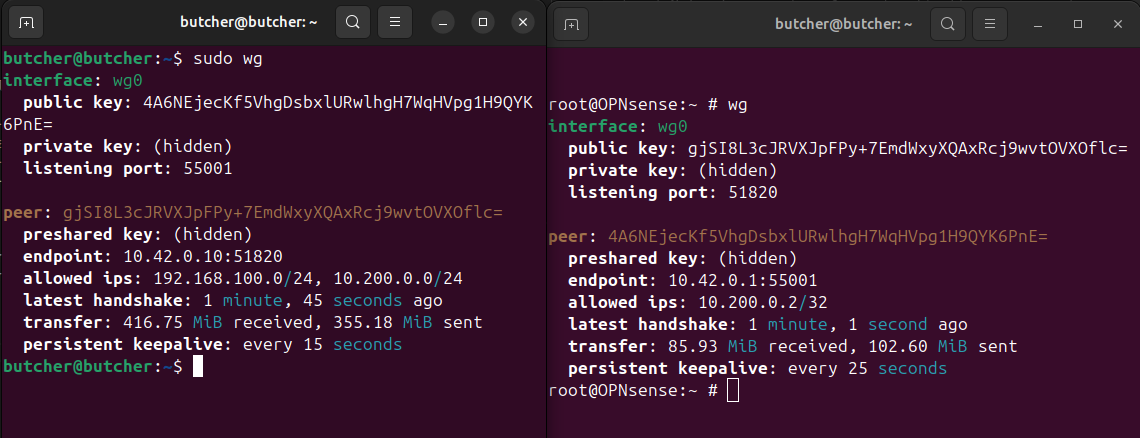
The WireGuard interface is wg0. This interface acts as a tunnel interface.
> How I setup this VPN tunnel?
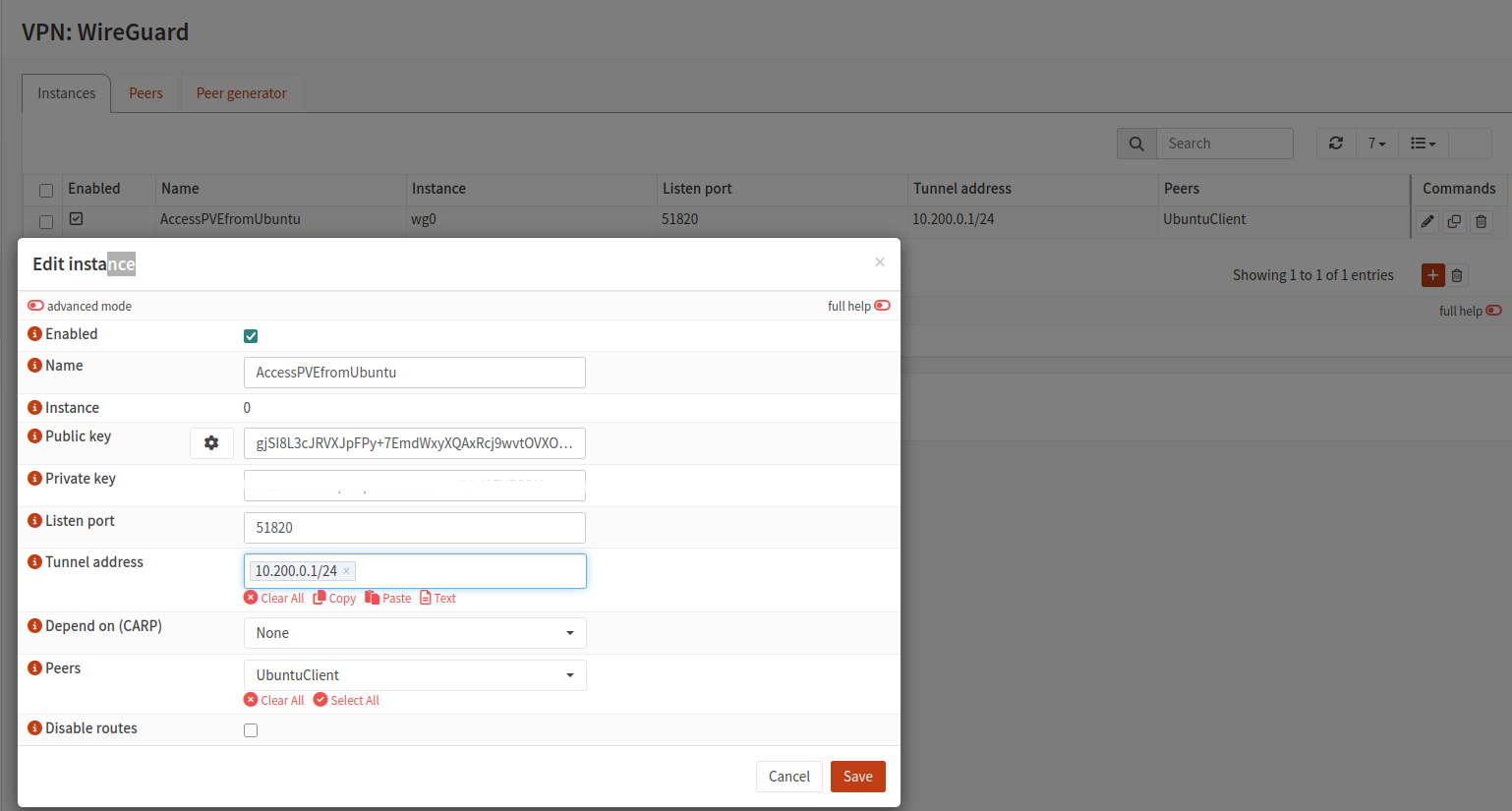
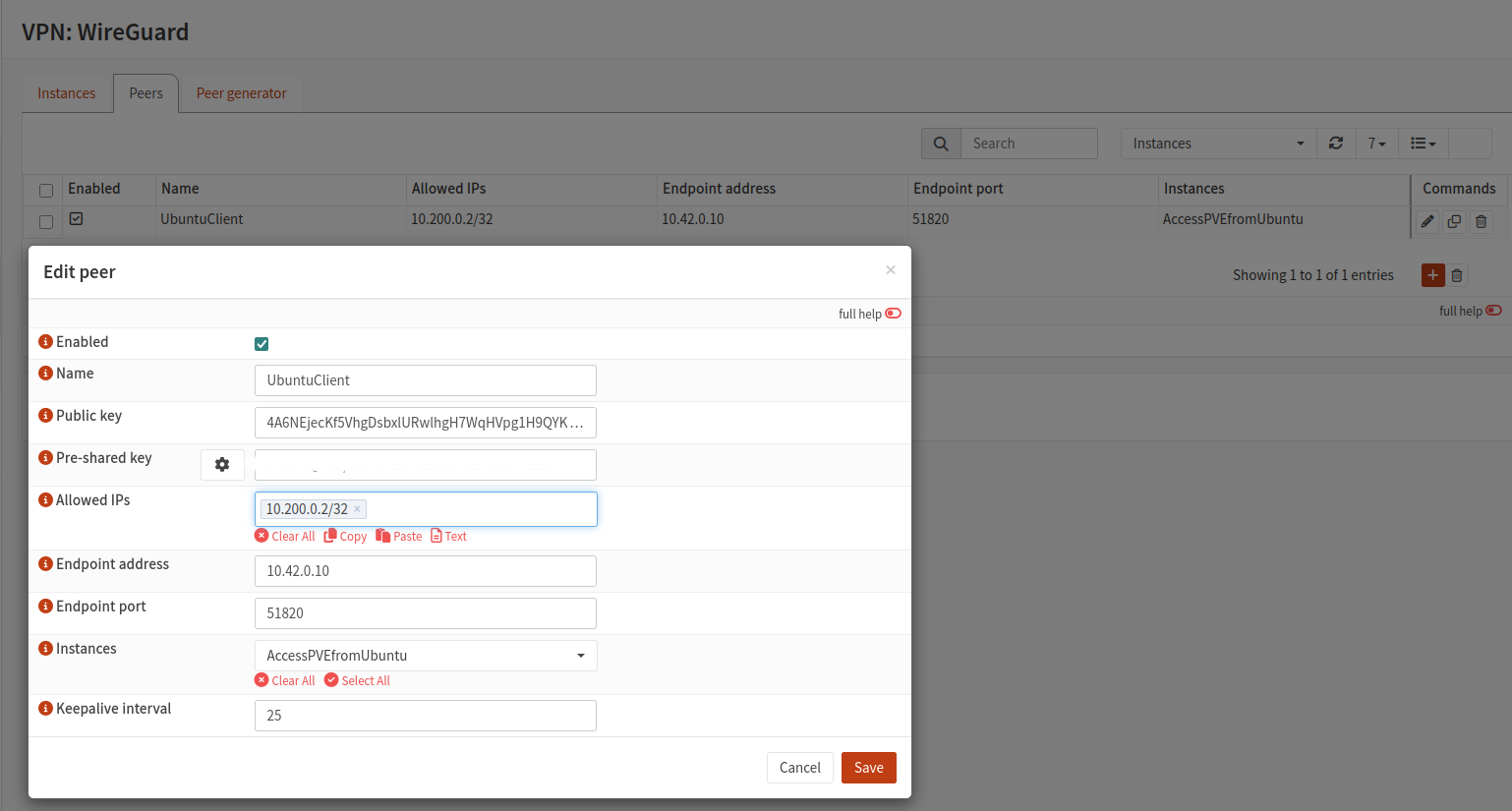
In OPNsense, web console
From VPN >WireGuard > Instances, initiate a tunnel instance and add a peer
In Ubuntu
- Install wireguard
1
 sudo apt install wireguard
- Generate Keys
1
  wg genkey | tee server_private.key | wg pubkey > server_public.key
- Create /etc/wireguard/wg0.conf
1
2
3
4
5
6
7
8
9
10
11
  [Interface]
  PrivateKey = <server_private.key content> # ubuntu's private key
  Address = 10.200.0.1/24
  ListenPort = 51820

  [Peer]
  PublicKey = <OPNsense client public key>
  PresharedKey = <OPNsense preshared key>
  AllowedIPs = 192.168.100.0/24, 10.200.0.0/24
  Endpoint = 10.42.0.10:51820
  PersistentKeepalive = 15
- Start WireGuard
1
2
3
4
sudo wg-quick up wg0

# To have the tunnel start automatically on Ubuntu boot
sudo systemctl enable wg-quick@wg0
- Troubleshooting
1
2
3
4
5
6
  # Down/up the tunnel
  sudo wg-quick down wg0
  sudo wg-quick up wg0

  # Force a manual handshake from Ubuntu
  sudo wg set wg0 persistent-keepalive 15
Here is an example of two peers being configured side by side. More details here
Reference
https://www.jordanwhited.com/posts/wireguard-endpoint-discovery-nat-traversal/