Let me C : Intro
C’s philosophy - “Don’t do anything the programmer didn’t ask for”
I am reading the book The C Programming Language, 2nd Edition by K&R. As I was going through the preface of the book, I liked this sentence and want to quote it: ‘C wears well as one’s experience with it grows.’ I had experience with C during my Uni days while I was pursuing my electrical engineering degree. I didn’t realize its importance at that point, but I am now realizing the depth of its presence. I am starting fresh from zero - let’s C how far I can C.
1
2
3
4
5
#include <stdio.h>
main()
{
    printf("Hello World\n");
}
To compile and run the script
1
$gcc helloworld.c -o helloworld && ./helloworld
As soon as I compiled it, it threw an error.
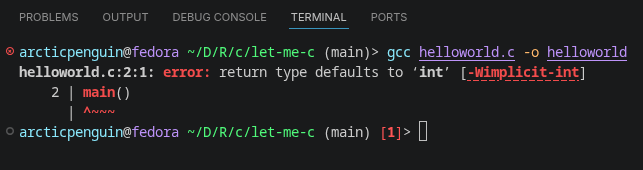
It turns out older C standards (K&R C /C89) allowed implicit init, meaning a function with no return type was assumed to return init. GCC now warns about this(and newer standards like C99/C11 removed it entirely).
1
$gcc -std=c89 helloworld.c -o helloworld
Choosing the C89 standard allowed me to run the code. But the right fix is adding init and it is the correct modern way.
1
2
3
4
5
6
#include <stdio.h>
int main()  // ✅
{
    printf("Hello, World!\n");
    return 0;
}
OR
1
2
3
4
5
6
#include <stdio.h>
int main(void)
{
    printf("Hello, World!\n");
    return 0;
}
Under the hood
There are three layers to it:
1
2
3
4
5
6
7
8
9
10
11
12
13
14
15
16
17
18
19
20
21
22
23
24
─────────────────────────────────────────
  YOUR CODE  (helloworld.c)
  #include <stdio.h>
─────────────────────────────────────────
        │ uses declarations from
        ▼
─────────────────────────────────────────
  HEADER FILES  (/usr/include/stdio.h)
  Just function signatures & macros
  Written by glibc developers
─────────────────────────────────────────
        │ actual code lives in
        ▼
─────────────────────────────────────────
  GLIBC  (/usr/lib64/libc.so.6)
  The real compiled implementation
  of printf, scanf, malloc, etc.
─────────────────────────────────────────
        │ talks to
        ▼
─────────────────────────────────────────
  LINUX KERNEL
  Does the real I/O, memory, etc.
─────────────────────────────────────────
The C Standard Library
It is a collection of pre-written functions that come bundled with your C compiler. Instead of writing everything from scratch, you can use these ready-made functions for common tasks like input/output, math, string manipulation, memory management, etc.
#include is a preprocessor directive- it tells compiler -“before compiling, copy the content of this file into my code”
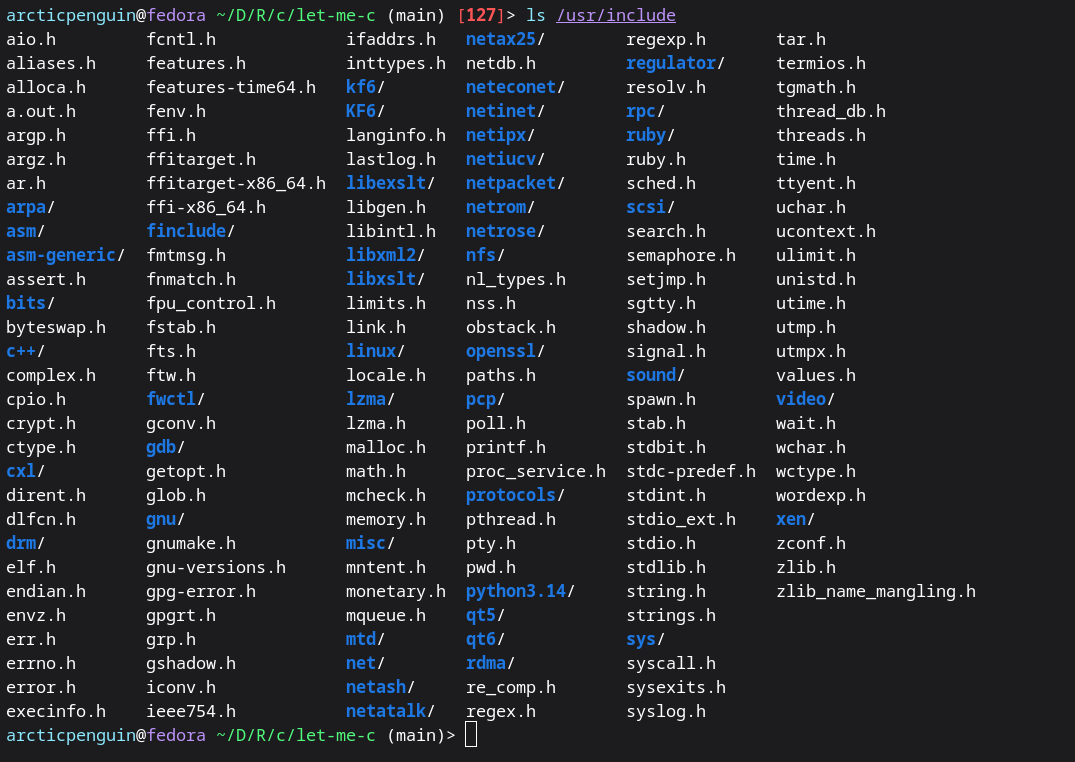
Here is a snippet of the stdio.h file: 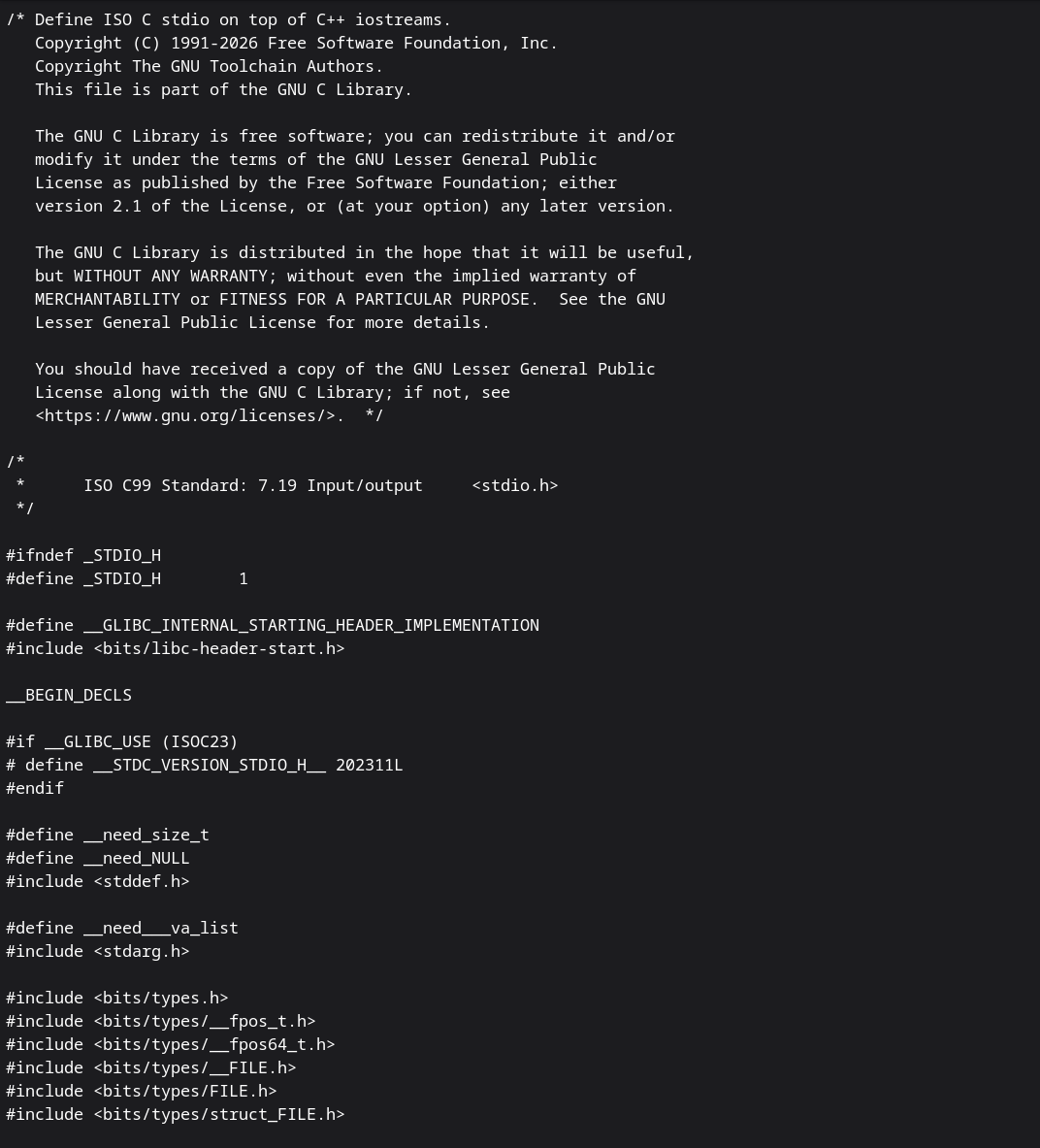
glibc = GNU C Library
It is the actual implementation of the C standard library made by the GNU project. It’s the engine behind all those functions you use.
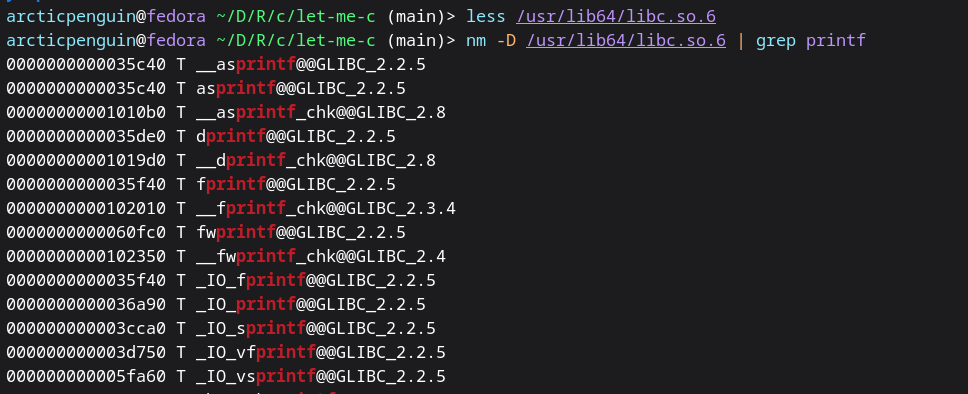
What is a symbol table? - When C source code gets compiled into a binary (.so file), the human-readable function names don’t disappear completely — they leave behind symbols so the system can find and link them at runtime.
What we are seeing is:
1
2
3
4
5
000000000001b110 T a64l
│                │  │
│                │  └── Function name (symbol)
│                └── Symbol type
└── Memory address (where it lives in the file)
When the program calls printf:
1
2
3
4
5
6
7
8
9
10
11
12
13
Our code says "call printf"
        │
        ▼
Linux loader opens /usr/lib64/libc.so.6
        │
        ▼
Looks up "printf" in the symbol table
        │
        ▼
Finds its memory address
        │
        ▼
Jumps to that address and executes the code
Chapter 1 : A Tutorial Introduction
Example 1
1
2
3
4
5
6
7
8
9
10
11
12
13
14
15
16
17
18
19
20
21
22
23
24
25
26
27
28
#include <stdio.h>

/*Implicit way*/
/*
main(){
    int c;
    c=getchar();
    while(c!=EOF){
        putchar(c);
        c=getchar();
    }
}
*/

/*Explict Way*/

main(){
    int c;
    int result;
    while ((c=getchar()) != EOF){
        result=(c!=EOF);
        putchar(c);
        printf("The value of while statement is %d\n", result);
    }
    result=(c!=EOF);
    printf("The value of while statement is now %d\n", result);

}
EOF- end of file- its value is defined as -1 in
getchar()-> Reads one character at a time from the input stream and returns it as an int. Returns EOF when input is exhausted. Always store into int, never char, to safely handle EOF.putchar()-> Writes one character at a time to the output stream. Takes an int, prints it as a character.
Key Rules
Every getchar() call consumes one character — permanently. Calling it twice per loop eats characters silently.
Enter (\n) is just a regular character — not EOF.
EOF is a condition, not a character — triggered by Ctrl+D on Linux/Mac or end of a piped input.
The idiomatic form while ((c = getchar()) != EOF) is preferred — one getchar(), no duplication, no bugs.
Example 2
1
2
3
4
5
6
7
8
#include <stdio.h>
int main(){
    long character_count;
    while(getchar() !=EOF){
        ++character_count;
    }
    printf("The total characters in the file or input is %ld", character_count);
}
1
2
3
4
5
6
7
8
# Compile and Run
(main)> gcc 1-5-2-Character-Counting.c -o 1-5-2-Character-Counting
(main)> ./1-5-2-Character-Counting

# Output
hello
world
The total characters in the file or input is 12⏎
OR
1
2
3
4
5
6
7
#include <stdio.h>
int main(){
    double character_count;
    for(character_count=0; getchar()!=EOF; ++character_count)
    ;
    printf(" The total character in the file or input is %.0f", character_count);
}
1
2
3
4
# Output

(main)> echo Hello\nWorld| ./1-5-2-Character-Counting
 The total character in the file or input is 12⏎
Key Points
++nc — increment operator, cleaner shorthand for nc = nc + 1. Has a mirror –nc for decrementing.
long type — used instead of int because input could exceed 32,767 characters (the max for a 16-bit int). Always use %ld with printf for long.
Example 3 Array
The below code is available here as well Array Example
1
2
3
4
5
6
7
8
9
10
11
12
13
14
15
16
17
18
19
20
21
22
int main()
{
    int c, i, nwhite, nother;
    int ndigit[10];

    nwhite = nother = 0;
    for (i = 0; i < 10; ++i)
        ndigit[i] = 0;

    while ((c = getchar()) != EOF)
        if (c >= '0' && c <= '9')
            ++ndigit[c-'0'];
        else if (c == ' ' || c == '\n' || c == '\t')
            ++nwhite;
        else
            ++nother;

    printf("digits =");
    for (i = 0; i < 10; ++i)
        printf(" %d", ndigit[i]);
    printf(", white space = %d, other = %d\n", nwhite, nother);
}
key points
1
int ndigit[10];
- Declares an array of 10 integers - one slot for each digit 0 through 9. Array indices always start at 0 in C.
1
2
for (i = 0; i < 10; ++i)
    ndigit[i] = 0;
- Arrays are not automatically zero in C - you must initialize them manually.
- In C, always initialize your variables and arrays before using them. Never assume memory is clean.
1
++ndigit[c - '0'];
- Since digit characters ‘0’ through ‘9’ have consecutive ASCII values (48–57), subtracting ‘0’ gives you the actual numeric value
Here it is:
c | ASCII value | c - '0' | Array slot |
|---|---|---|---|
'0' | 48 | 0 | ndigit[0] |
'3' | 51 | 3 | ndigit[3] |
'9' | 57 | 9 | ndigit[9] |
With this in mind, we will look at arrays more in Character Array topic, which is more interesting.
Example 4 Function
1
2
3
4
5
6
7
8
9
10
11
12
13
14
15
16
17
18
19
20
21
#include <stdio.h>
int power(int m, int n);  /* function prototype */

/* test power function */
int main()
{
    int i;
    for (i = 0; i < 10; ++i)
        printf("%d %d %d\n", i, power(2,i), power(-3,i));
    return 0;
}

/* power: raise base to n-th power; n >= 0 */
int power(int base, int n)
{
    int i, p;
    p = 1;
    for (i = 1; i <= n; ++i)
        p = p * base;
    return p;
}
Key Points
int power(int m, int n); /* declared BEFORE main */tells the compiler what to expect before it sees the actual function definitionint power(int, int); /* names omitted — still valid */
Example 5 Character Arrays
Before diving into the details, let’s look at how it is different from python.
1
2
name="satish"
print(name) #just works
In C, printf has no idea where your string ends — it just walks memory until it hits ‘\0’:
1
2
3
4
5
char name[7] = "Satish";   // '\0' added automatically by the string literal
printf("%s", name);         // walks until '\0' — prints "Satish"

char name2[6] = {'S','a','t','i','s','h'};  // no '\0' !
printf("%s", name2);   // prints "Satish" then keeps going into garbage memory
Now lets start with this basic example to have a foundational understanding of character array before moving on to the example of book.
1
2
3
4
5
6
7
8
9
10
11
12
13
#include <stdio.h>
int main(){
    char word[10];
    int c, i;
    i=0;
    printf("Enter the word:");
    while((c=getchar())!='\n' && c!=EOF)
        word[i++]=c;
    word[i]='\0';
    printf("The word you entered is %s\n", word);
    printf("The length of the word is %d",i);
    return 0;
}
1
2
3
4
5
6
#Output

$ ./1-9-Character-Arrays-Foundation
Enter the word:Satish
The word you entered is Satish
The length of the word is 6⏎
key points
word[i++]is two operations in one:- word[i]=c -> store the character at current position
i++-> then moves to the next slot
- The
++is postfix -> it usesifirst, then increments. - The null terminator
word[i]='\0', without itprintf("%s", word)would print the word and then keep reading garbage memory until it accidentally hits a zero byte somewhere. word[10]-> This array only has 10 slots (indices 0–9). If the user types more than 9 characters, i reaches 9 and you’d write word[10] — one past the end. This is called a buffer overflow — one of the most dangerous bugs in C.
K&R wrote this book in 1988. Back then getline didn’t exist in the standard library. Modern Linux’s
Example Flow:
1
2
3
4
5
6
7
Input: "hi\nlongest line\nok\n"

Iteration 1: my_getline → "hi\n"        len=3  → max=3  → copy to longest
Iteration 2: my_getline → "longest\n"   len=9  → max=9  → copy to longest
Iteration 3: my_getline → "ok\n"        len=3  → 3<9    → skip
EOF:          my_getline → returns 0    → loop exits
                                        → print "longest line"
Example 6 External Variable and Scope
Here is the book example
1
2
3
4
5
6
7
int max;                /* external — every function can see this */
char line[MAXLINE];     /* external — every function can see this */
char longest[MAXLINE];  /* external — every function can see this */

int main() { ... }
int getline(void) { ... }
void copy(void) { ... }
Definition vs Declaration
Definition — creates the variable, allocates memory. Happens exactly once:
1
2
int max;              /* DEFINITION — memory allocated */
char line[MAXLINE];   /* DEFINITION — memory allocated */
Declaration — announces the variable exists somewhere. No memory allocated:
1
2
extern int max;        /* DECLARATION — no memory allocated */
extern char longest[]; /* DECLARATION — no memory allocated */
When to use extern extern is redundant when the variable is defined earlier in the same file:
1
2
3
4
5
6
int max;        /* defined at top */

int main() {
    extern int max;   /* redundant — compiler already saw it */
    max = 0;          /* works either way */
}
Common practice — define all external variables at the top, omit extern:
1
2
3
4
5
6
7
int max;
char line[MAXLINE];
char longest[MAXLINE];

int main() {
    max = 0;    /* no extern needed */
}
extern becomes essential across multiple files:
1
2
3
4
file1.c                    file2.c
───────────────────        ──────────────────
int max;                   extern int max;    ← required
char line[MAXLINE];        extern char line[];
Key Points:
- Local variables are private, temporary, and passed explicitly — clean and safe.
- External variables are global, permanent, and visible everywhere — convenient but risky.
- Definition allocates memory (once). Declaration (extern) just announces the variable.
- extern can be omitted when the definition appears earlier in the same file.
- Use external variables sparingly — hidden data flow leads to bugs and unmaintainable code.
Now with this foundational knowledge, we will expand our understanding of additional capabilities of C in another post. Stay tunned.