Let me C : Structures
I am hoping the struct concept is easier to wrap my head around than pointer. Pointer gave me PTSD and I still have difficulty sleeping at night. The only good thing came out of pointer, not for me but for my wife - I’m now afraid to point my finger at her mistakes. I now point to a pointer of her mistake. Got it? Let’s dive into struct.
The Core Idea
A structure is a collection of one or more variables, possibly of different types, grouped together under a single name for convenient handling.
1
2
3
4
5
// Structure Declaration (the template)
struct point {
    int x;
    int y;
};
- This defines the shape of a structure but creates no variable and allocates no memory - like designing a blank form.
1
2
// Structure Variable Declaration (instantiation)
struct point origin;
struct pointacts as a type name (likeint). This line actually creates a variable and allocates memory for it - like photocopying the blank form.1 2 3
// The Dot(.) operator - accessing members origin.x=10; origin.y=20;
- Reaches into a struct variable to read/write a specific member.
1
2
// Initialization at Declaration
struct point pt={10,20};
Creates and fills in a struct in one step. Values are matched in order to the members as declared.
1
2
3
4
5
  // Nested Structures
  struct rect {
      struct point pt1;   // upper-left
      struct point pt2;   // lower-right
  };
- A struct can contain other structs as members - building complex shapes from simpler ones.
1
2
// Chained Dot Access
screen.pt2.y = 100;
Structures and Functions
In this section, there are mainly three ideas that are introduced for passing the function arguments:
- pass the values
- pass the entire structure
- pass the pointer to a structure
Let’s look at the legal operations first:
- copy it/assign it to another variable of the same type
1
2
3
4
  struct point p1 = {10, 20};
  struct point p2;

  p2 = p1;        // legal: copies ALL members (x and y) from p1 into p2
1
  if (p1 == p2)   // COMPILE ERROR - not allowed in C
Taking the address of a struct
Just like you can do &x for a plain int to get its memory address, you can do the exact same thing for a struct variable as a whole:
1
2
3
4
  struct point origin = {10, 20};
  struct point *p;

  p = &origin;    // p now holds the memory address of origin
(*p).xandp->x1 2
(*p).x // dereference p first, then access x - the parens are required p->x // the shorthand arrow operator - cleaner, does the same thing
Let’s look at what it means with an example:
1
2
3
4
5
6
7
  struct point {
      int x;
      int y;
  };

  struct point origin = {10, 20};
  struct point *p = &origin;   // p points to origin
Method 1:
(*p).x1 2 3
(*p).x = 100; // step 1: *p means "the struct origin" // step 2: .x means "its x member" // net effect: origin.x = 100
Note:
*p.xbreaks because.operator has higher precedence that the*(dereference) operator so it means*(p.x)which means take p and access it’s .x member and then dereference the result - compile errorMethod 2 :
p->x(the arrow operator)C recognized that (*p).x is clunky and error-prone (easy to forget the parens), so it provides -> as a single operator that does both steps at once:
1
  p->x = 100;   // identical result to (*p).x = 100
1. Passing Structs to Functions
1
2
3
4
int ptinrect(struct point p, struct rect r) {
    return p.x >= r.pt1.x && p.x < r.pt2.x
        && p.y >= r.pt1.y && p.y < r.pt2.y;
}
- Structs are passed by value (a full copy)
- Modifying p or r inside the function never affects the caller’s originals.
2. Returning Structs - Composability
1
2
3
4
5
struct point addpoint(struct point p1, struct point p2) {
    p1.x += p2.x;
    p1.y += p2.y;
    return p1;   // returns the modified copy - caller's originals untouched
}
3. Pointers to Structs - Avoiding Expensive Copies
1
2
3
4
int ptinrect(struct point p, struct rect *rp) {
    return p.x >= rp->pt1.x && p.x < rp->pt2.x
        && p.y >= rp->pt1.y && p.y < rp->pt2.y;
}
- Passing large structs by value copies lots of bytes. A pointer avoids this - only the address is copied.
Arrays of Structures
Let’s look at what we have already established first.
- A struct groups different pieces of data together
1
2
  struct point { int x; int y; };
  struct point p = {10, 20};   // ONE point
- An array holds many values of the same types side by side (From Chapter- Pointer)
1
  int scores[3] = {90, 85, 95};   // THREE ints, side by side
So
Arrays of Structuresjust combines these two ideas: instead of an array holding plain ints side-by-side, it holds multiple structs side-by-side.1 2
struct point points[3] = { {0,0}, {5,5}, {10,10} }; // ^this array holds THREE struct point values
Now lets look at K&R’s example:
1
2
3
4
5
6
7
8
9
10
11
12
13
14
15
16
struct key {
    char *word;    // the keyword text, e.g. "if"
    int count;     // how many times it's been seen
};

struct key keytab[] = {
    {"auto", 0},
    {"break", 0},
    {"case", 0},
    {"char", 0},
    {"if", 0},
    {"while", 0}
    /* ... and so on for every C keyword ... */
};

#define NKEYS (sizeof(keytab) / sizeof(keytab[0]))
1
2
3
if (strcmp(keytab[2].word, "case") == 0) {
    printf("Match!\n");
}
Here is another example from K&R about binary search but for the array of structs:
What is binary search?
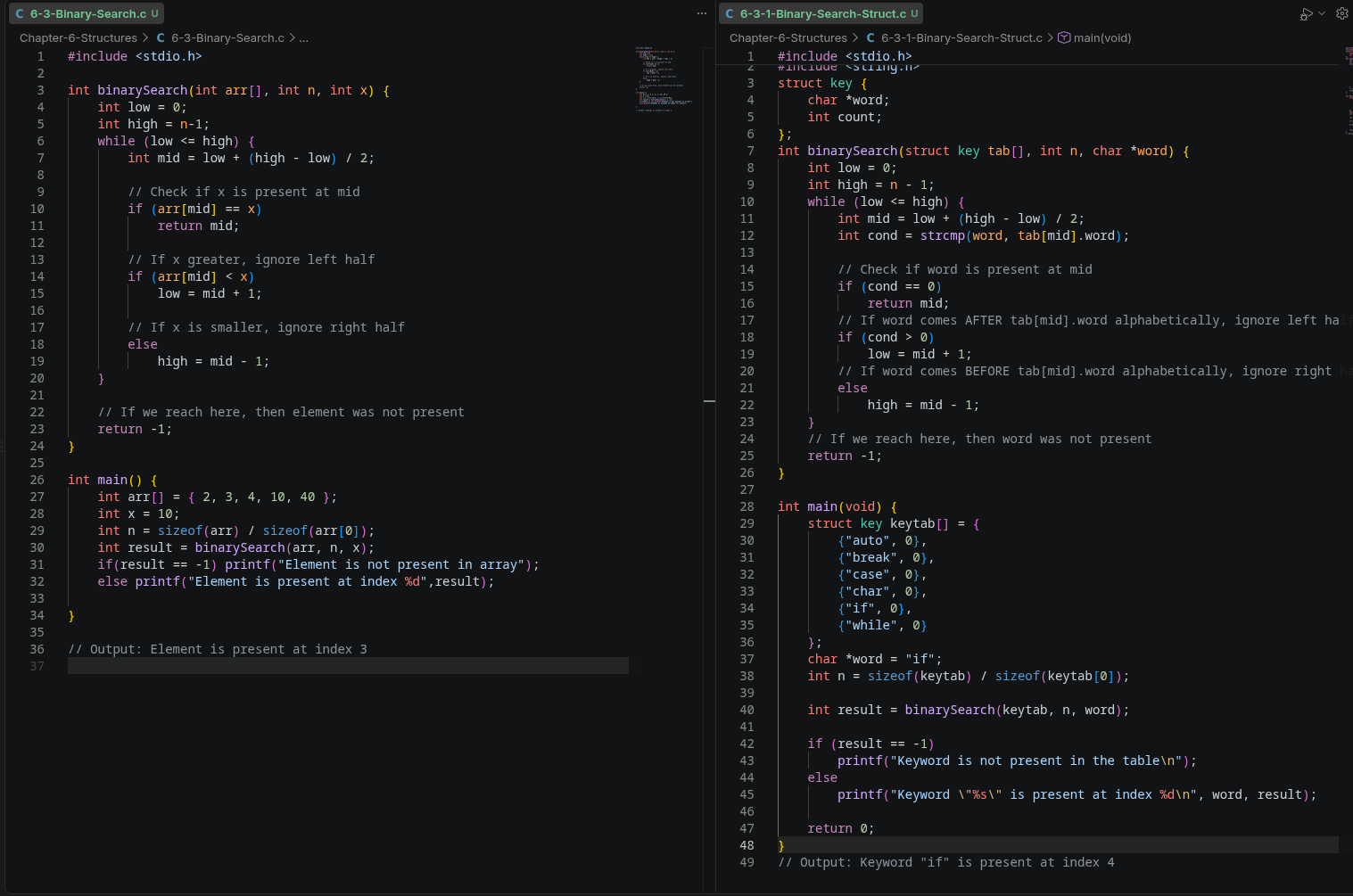
Pointers to Structures
If you are able to untangle the binary search code below, piece by piece then you will hopefully get the gist of pointers to structures.
This was kind of hard for me to grab the concept the first time but staring at it for a while and going through the steps one at a time made it easier to grasp.
I am leaving this section with just the code snippet below for future me to pull the hair and hopefully recall what is happening here.
1
2
3
4
5
6
7
8
9
10
11
12
13
14
15
16
17
18
19
20
21
22
23
24
25
26
27
28
29
30
31
32
33
34
35
36
37
38
39
40
41
42
43
44
45
46
47
48
#include <stdio.h>
#include <string.h>

struct key {
    char *word;
    int count;
};

struct key *binsearch(char *word, struct key *tab, int n) {
    int cond;
    struct key *low = tab;
    struct key *high = tab + n - 1;
    struct key *mid;

    while (low <= high) {
        mid = low + (high - low) / 2;
        cond = strcmp(word, mid->word);
        if (cond < 0)
            high = mid - 1;
        else if (cond > 0)
            low = mid + 1;
        else
            return mid;      // return pointer to the matching struct
    }
    return NULL;   // not found - NULL pointer signals failure
}

int main(void) {
    struct key keytab[] = {
        {"auto", 0},
        {"break", 0},
        {"case", 0},
        {"char", 0},
        {"if", 0},
        {"while", 0}
    };
    int n = sizeof(keytab) / sizeof(keytab[0]);
    char *target = "if";

    struct key *result = binsearch(target, keytab, n);

    if (result == NULL)
        printf("Keyword \"%s\" not found\n", target);
    else
        printf("Keyword \"%s\" found, count = %d\n", result->word, result->count);

    return 0;
}
One thing I will add from the book is the way the binsearch could be declared:
1
2
struct key *binsearch(char *word, struct key *tab, int n)   // pointer form
struct key *binsearch(char *word, struct key tab[], int n)  // array form
Self-referential Structures
It is a struct that has, as one of its members, a pointer to another struct of the same type.
1
2
3
4
5
6
struct tnode {
    char *word;
    int count;
    struct tnode *left;    // pointer to another tnode
    struct tnode *right;   // pointer to another tnode
};
Warning!!! The Crucial Rule: It MUST Be a Pointer, Not the Struct Itself
1
2
3
4
5
6
struct tnode {
    char *word;
    int count;
    struct tnode left;    // ILLEGAL - compile error
    struct tnode right;   // ILLEGAL - compile error
};
Why this fails: For the compiler to know how many bytes struct tnode needs, it must know the size of every member. But if left is itself a full struct tnode, that struct would need to contain another left, which needs another, forever - an infinitely large, never-completable struct. The compiler can’t compute a finite size for something that’s infinitely nested inside itself.
Why a pointer fixes this: A pointer’s size is always fixed (e.g., 8 bytes on most modern systems), regardless of what type it points to. So struct tnode *left; just needs 8 bytes for the pointer itself - no matter how large or deeply-nested the tree eventually grows. The compiler doesn’t need to know the “final size” of the whole tree upfront, just the size of one address.
NULL as No Child Exists
Since not every node has both a left and right child, C needs a way to represent “this pointer doesn’t point to a real node.” That’s exactly what NULL is for:
1
struct tnode *root = NULL;   // an empty tree - no nodes yet
Or for a leaf node (no children)
1
2
3
4
5
struct tnode leaf;
leaf.word = "hello";
leaf.count = 1;
leaf.left = NULL;    // no left child
leaf.right = NULL;   // no right child
Example: Binary Tree Word Count
One thing I would like to briefly touch.
1
void *malloc(size_t size);
This is a function declaration (a prototype) - it lives in the header file <stdlib.h>
What it’s saying: “Somewhere, there exists a function named malloc. It takes one parameter, size (of type size_t, basically an unsigned integer used for sizes/counts). It returns a void * (an unlabeled pointer).”
1
malloc(sizeof(struct tnode));
This is a function call.
What it’s saying: “Call the malloc function. Pass it the value sizeof(struct tnode) as the size argument.” This actually executes at runtime and returns a real pointer value (which you’d typically store somewhere, like p = malloc(…)).
In our example: This says, “give me exactly enough bytes for one struct tnode.” Since sizeof(struct tnode) is always a fixed, computable number (thanks to the self-referential pointer rule you just learned!), malloc knows precisely how much space to carve out - one node’s worth, no more, no less.
Why talloc Exists as a Wrapper?
1
2
3
struct tnode *talloc(void) {
    return (struct tnode *) malloc(sizeof(struct tnode));
}
To understand the above code lets understand the code below first.
1
2
struct tnode *p;
p = malloc(sizeof(struct tnode));   // no cast
We have established that malloc(sizeof(struct tnode)); return void * (an unlabeled pointer), but here we are assigning it to p and type of p is struct tnode. We are assigning an “unlabeled box” into a variable that expects a “box specifically labeled struct tnode.”
In C, this actually works without a cast (unlike C++), because C allows automatic conversion from void * to any other pointer type. But it’s still common/good style to be explicit about it, and K&R does so for clarity.
So what we do, we make the label explicit with cast
1
2
3
p = (struct tnode *) malloc(sizeof(struct tnode));
//   ^^^^^^^^^^^^^^^
//   this is the cast
(struct tnode *) in front of an expression means: “treat whatever comes next as this type.” We are taking the generic void * that malloc returns, and explicitly telling the compiler: “I know this is unlabeled, but I want you to now treat it as a struct tnode *.”
To solidify the above concept, lets look at the below code snippet that uses the cast to convert the return type to int
1
2
3
4
int *p;
p = (int *) malloc(sizeof(int));   // reserve enough bytes for ONE int, label the result as "int *"
*p = 42;                            // now safe to use p as a pointer to an int
printf("%d\n", *p);                 // prints 42
With this build up and foundation, lets look at the binary tree word count example.
1
2
3
4
5
6
7
8
9
10
11
12
13
14
15
16
17
18
19
20
21
22
23
24
25
26
27
28
29
30
31
32
33
34
35
36
37
38
39
40
41
42
43
44
45
46
47
48
49
50
51
52
53
54
55
56
57
58
59
60
61
62
63
64
65
66
67
68
69
70
71
72
73
74
75
76
77
78
#include <stdio.h>
#include <string.h>
#include <stdlib.h>
#include <ctype.h>

#define MAXWORD 100

struct tnode {
    char *word;
    int count;
    struct tnode *left;
    struct tnode *right;
};

struct tnode *talloc(void) {
    return (struct tnode *) malloc(sizeof(struct tnode));
}

struct tnode *addtree(struct tnode *p, char *w) {
    int cond;

    if (p == NULL) {
        p = talloc();
        p->word = strdup(w);
        p->count = 1;
        p->left = p->right = NULL;
    } else if ((cond = strcmp(w, p->word)) == 0) {
        p->count++;
    } else if (cond < 0) {
        p->left = addtree(p->left, w);
    } else {
        p->right = addtree(p->right, w);
    }
    return p;
}

void treeprint(struct tnode *p) {
    if (p != NULL) {
        treeprint(p->left);
        printf("%4d %s\n", p->count, p->word);
        treeprint(p->right);
    }
}

int getword(char *word, int lim) {
    int c;
    char *w = word;

    while (isspace(c = getchar()))
        ;
    if (c != EOF)
        *w++ = c;
    if (!isalpha(c)) {
        *w = '\0';
        return c;
    }
    for ( ; --lim > 0; w++) {
        if (!isalnum(*w = getchar())) {
            ungetc(*w, stdin);
            break;
        }
    }
    *w = '\0';
    return word[0];
}

int main(void) {
    struct tnode *root;
    char word[MAXWORD];

    root = NULL;
    while (getword(word, MAXWORD) != EOF) {
        if (isalpha(word[0]))
            root = addtree(root, word);
    }
    treeprint(root);
    return 0;
}
With the above example we are entering the realm of DSA, so I don’t want to go through another rabbit hole for now. I will leave it to future me to revisit the code, when I am ready to dive into DSA. For now, I think I have gained sufficient knowledge about self-referential structure to proceed.
Table Lookup
Here, again I will not go through the whole code. This is a problem for future me. What I get from the section is that instead of binary tree, where each node has two elements or NULL. Using self-referential struct, it can be used to arrange data this way as well:
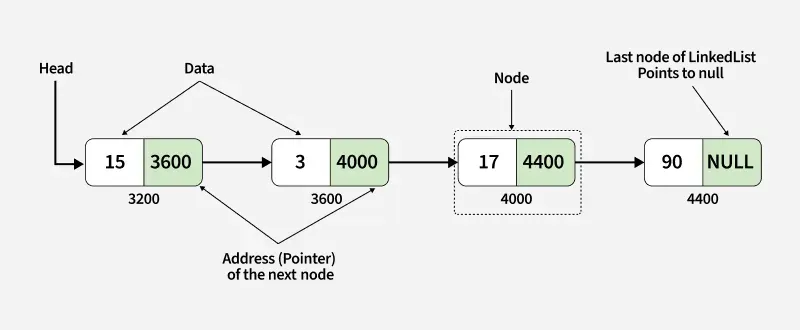
Image Source: https://www.geeksforgeeks.org/dsa/linked-list-data-structure/
1
2
3
4
struct tnode {
    char *word;
    struct tnode *next;
};
There is a lot going on the code. The question a hash table asks: what if, instead of comparing your way to the right spot, you could somehow compute exactly where a word should live, directly from the word itself - with zero comparisons needed to find the right neighborhood?
1
2
3
4
5
6
7
8
9
10
11
12
13
14
15
16
17
18
19
20
21
22
23
24
25
26
27
28
29
30
31
32
33
34
35
36
37
38
39
40
41
42
43
44
45
46
47
48
49
50
51
52
53
54
55
56
57
58
59
60
61
62
63
64
65
66
67
#include <stdio.h>
#include <string.h>
#include <stdlib.h>

#define HASHSIZE 101

struct nlist {
    struct nlist *next;   // next entry in same bucket's chain
    char *name;
    char *defn;
};

static struct nlist *hashtab[HASHSIZE];   // array of "shelves"

unsigned hash(char *s) {
    unsigned hashval;
    for (hashval = 0; *s != '\0'; s++)
        hashval = *s + 31 * hashval;
    return hashval % HASHSIZE;
}

struct nlist *lookup(char *s) {
    struct nlist *np;
    for (np = hashtab[hash(s)]; np != NULL; np = np->next)
        if (strcmp(s, np->name) == 0)
            return np;
    return NULL;
}

struct nlist *install(char *name, char *defn) {
    struct nlist *np;
    unsigned hashval;

    if ((np = lookup(name)) == NULL) {
        np = (struct nlist *) malloc(sizeof(*np));
        if (np == NULL || (np->name = strdup(name)) == NULL)
            return NULL;
        hashval = hash(name);
        np->next = hashtab[hashval];
        hashtab[hashval] = np;
    } else {
        free((void *) np->defn);
    }
    if ((np->defn = strdup(defn)) == NULL)
        return NULL;
    return np;
}

int main(void) {
    install("PI", "3.14159");
    install("E", "2.71828");
    install("MAX", "100");

    struct nlist *found = lookup("PI");
    if (found != NULL)
        printf("PI is defined as %s\n", found->defn);

    found = lookup("MISSING");
    if (found == NULL)
        printf("MISSING is not defined\n");

    install("PI", "3.14159265");   // updates existing entry
    found = lookup("PI");
    printf("PI is now defined as %s\n", found->defn);

    return 0;
}
1
2
3
PI is defined as 3.14159
MISSING is not defined
PI is now defined as 3.14159265
Typedef
1
typedef struct nlist Nlist;
Let Nlist be another name for struct nlist.” After this line, you can use Nlist anywhere you’d normally write struct nlist:
1
2
struct nlist *lookup(char *s);        // before
Nlist *lookup(char *s);               // after - shorter, still clear
Unions
If we recall a struct, each member gets its own separate space in memory.
1
2
3
4
5
struct example {
    int i;
    float f;
    char c;
};
Memory-wise, this is like three separate mailboxes side by side - one for i, one for f, one for c - each holding its own value simultaneously, independent of the others.
A union looks almost the same syntactically:
1
2
3
4
5
 union example {
    int i;
    float f;
    char c;
};
But here’s the critical difference: all the members share the exact same memory location. There’s only one mailbox, big enough to hold the largest member - and at any given moment, only one of i, f, or c actually holds a meaningful value. Writing to one member overwrites whatever was in another.
1
2
struct s_tag { int i; float f; char c; };   // sizeof ≈ sum of all members (plus padding)
union  u_tag { int i; float f; char c; };   // sizeof = size of the LARGEST member only
Bit-fields
1. The Core Idea
Bit-fields let you pack multiple small values into a single unit of storage, specifying exactly how many bits each member should occupy - useful when values only ever need a few bits (like on/off flags), avoiding the waste of giving each one a full int or char.
2. The Old Way (Manual Bitmasking)
Before bit-fields, flags were packed manually using bitwise operators and mask constants:
1
2
3
4
5
#define KEYWORD  01
#define EXTERNAL 02
flags |= EXTERNAL;      // turn on a bit
flags &= ~KEYWORD;      // turn off a bit
if (flags & STATIC)     // check a bit
3. Bit-Field Syntax
Declared inside a struct, with : N specifying the bit-width:
1
2
3
4
5
struct {
    unsigned int is_keyword : 1;
    unsigned int is_extern  : 1;
    unsigned int is_static  : 1;
} flags;
4. Usage – Looks Like Ordinary Struct Access
No manual bit-twiddling needed - the compiler handles it:
1
2
3
flags.is_keyword = 1;
if (flags.is_keyword)
    printf("This is a keyword\n");
5. Space Savings (Proven)
Three separate 1-bit fields packed together took just 4 bytes total (one unsigned int’s worth), not 3 separate ints - confirmed via sizeof(flags).
6. Key Caveats
- Not fully portable - exact bit packing order/alignment is implementation-defined (varies by compiler/machine).
- Cannot take the address of a bit-field member (
&flags.is_keywordis illegal) - no bit-field has a standalone byte address. - Declare bit-fields as
unsigned intfor the safest, most predictable behavior.